Power Switch Model

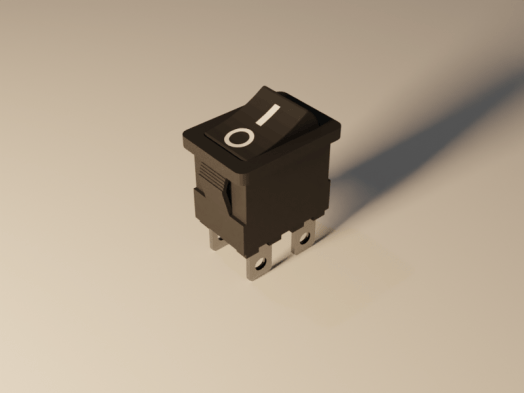
A new model has been posted on CGTrader. It’s a rocker switch with power on and off markings. It was modeled in Blender 2.80, but it was rendered in the Blender 2.81. Then new version of blender has a noise removal node for the compositor. It works great.

Render 2.pngThe new noise removal node is not available in 2.80. Go to the Blender download page and scroll to the bottom.  Click the “Get Blender Experimental” button and download. You will get an compressed file. I created a new folder (c:\program files\blender\blender2.81) and extracted all the files there. Then just double click the blender.exe file to run.
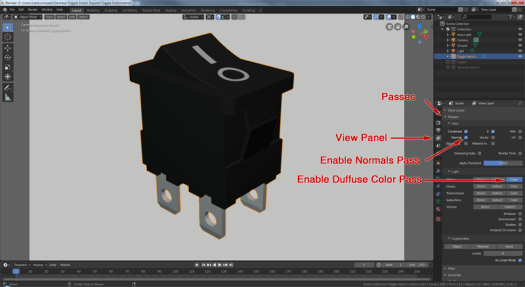
To use the node, enable a few render passes that the node uses. Go to the View Panel and expand the Passes section. Enable the Normal Pass and the Diffuse Color Pass.

Untitled-2.png

Continue reading “Power Switch Model”

Blender Quick Tip – Auto Merge

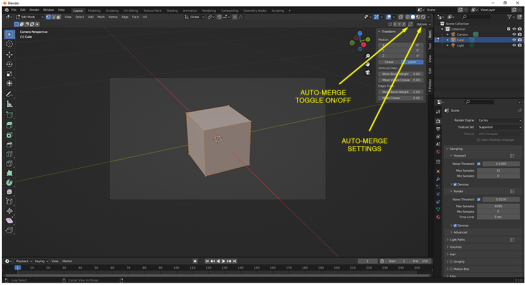
Update: 5/27/2022: They keep moving auto-merge. In Blender version 3.1.0 while in edit mode, the auto-merge has a convenient on-off toggle and link to the auto-merge settings in the upper right corner. These buttons are visible when the “Tool Settings” are enabled. To enable the “Tool Settings”, click the “Tool Settings” from the View drop-down menu until there is a check mark next to it.

Auto-merge-310

When you move a vertex over another, many times you want the two to become one. There is a tedious way: Move the vertex and then merge. Or the easy way: Enable the  Auto-Merge option and then just move one vertex over another.

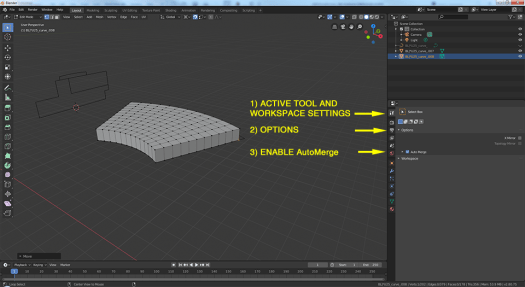
In Blender 2.80, the Auto-Merge option has moved. It is now in the Active Tool and Workspace panel under “Options”

MergeVertices

Taming Blender 2.79 Units for 3D Printing

Here are my go to settings for Blender when I am modelling for a 3D Print

Imperial Settings

To design in inches and export an STL file at the proper scale:

  • In the Properties Panel, go to the Scene Tab.
  • In the Units section, Change the Units to “inches”, the length to “imperial” and the Unit Scale to 0.0254.
  • When you export your model as an STL file, set the scale to 25.4.

Continue reading “Taming Blender 2.79 Units for 3D Printing”

Photo Reconstruction without Photogrammetry

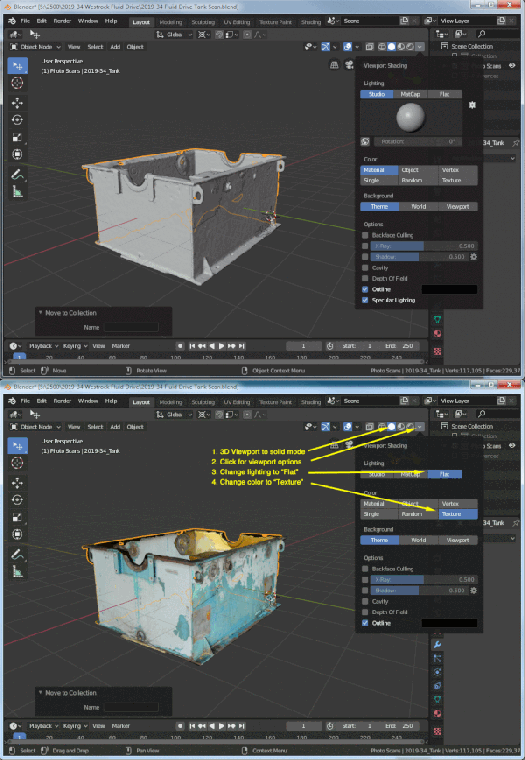
Photogrammetry is a cool technology, but it’s difficult to get a usable model. Most of the models I make have large holes or areas where the mesh is way off. Where the model is not way off…there is usually a tight mesh that isn’t required. Next…there are the shadows. Photogrammetry adds the lighting from your photo shoot to the model and this isn’t desirable (unless you are duplicating the lighting…which basically never happens). Continue reading “Photo Reconstruction without Photogrammetry”